Site in read-only mode
This site is now read-only following the release of MyBB 1.8 and the new mods site.
If you are looking for MyBB 1.8 mods please click here to visit the new mods site.
You can continue to download submissions for MyBB 1.6 and earlier here, however new submissions will only be accepted via the new mods site.
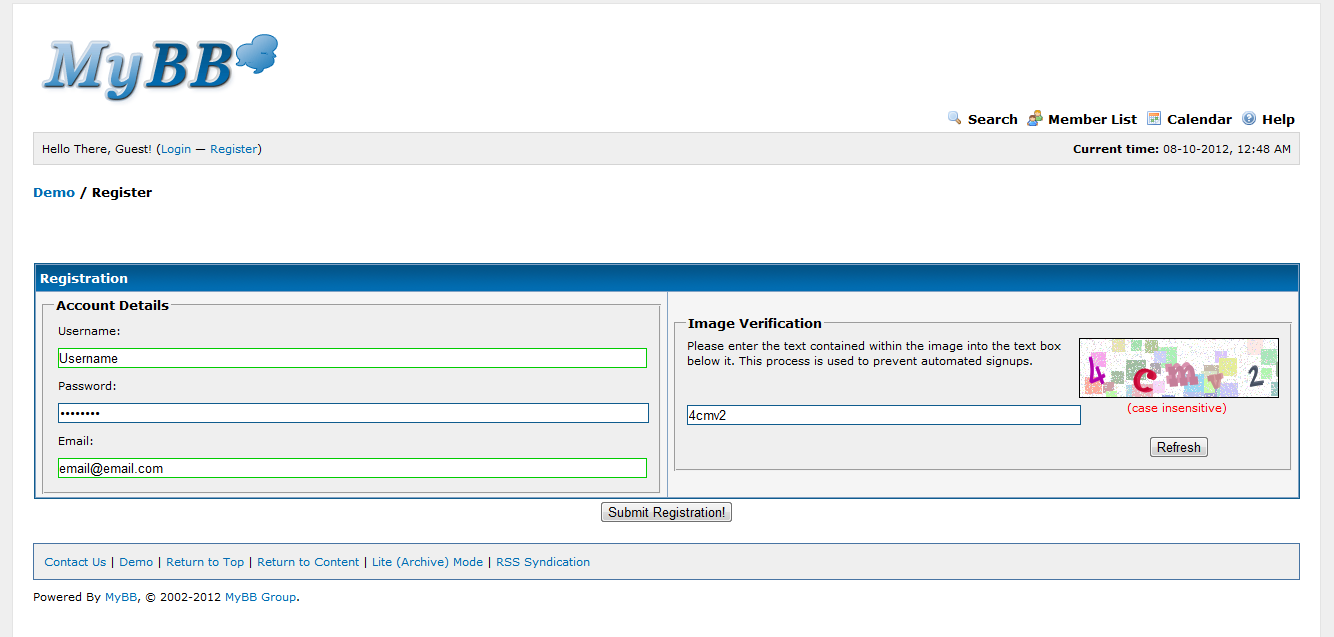
Short Registration
Make it a lot easier for people to sign up to your forums with this resource.
If you wan't your forum members to have a quick and easy registration just
go to (Admin CP -> Templates & Style -> Template Sets ->
YOUR_TEMPLATE -> Member Templates -> member_register) And replace
everything with this code.
Code:
<html>

<head>

<title>{$mybb->settings['bbname']} -
{$lang->registration}</title>

{$headerinclude}

<script type="text/javascript"
src="jscripts/validator.js"></script>

</head>

<body>

{$header}

<br />

<form action="member.php" method="post"
id="registration_form"><input type="text" style="visibility: hidden;"
value="" name="regcheck1" /><input type="text" style="visibility:
hidden;" value="true" name="regcheck2" />

{$regerrors}

<table border="0" cellspacing="{$theme['borderwidth']}"
cellpadding="{$theme['tablespace']}" class="tborder">

<tr>

<td class="thead"
colspan="2"><strong>{$lang->registration}</strong></td>

</tr>

<tr>

<td width="50%" class="trow1" valign="top">

<fieldset class="trow2">

<legend><strong>{$lang->account_details}</strong></legend>

<table cellspacing="0" cellpadding="{$theme['tablespace']}"
width="100%">

<tr>

<td colspan="2"><span class="smalltext"><label
for="username">{$lang->username}</label></span></td>

</tr>

<tr>

<td colspan="2"><input type="text" class="textbox" name="username"
id="username" style="width: 100%" value="{$username}"
/></td>

</tr>

<tr>

<td><span
class="smalltext">{$lang->password}</span></td>

</tr>

<tr>

<td><input type="password" class="textbox" name="password"
id="password" style="width: 100%" /></td>

</tr>

<tr>

    <td colspan="2" style="display: none;"
id="password_status"> </td>

</tr>

<tr>

<td><span class="smalltext"><label
for="email">{$lang->email}</label></span></td>

</tr>

<tr>

<td><input type="text" class="textbox" name="email" id="email"
style="width: 100%" maxlength="50" value="{$email}" /></td>

</tr>

<tr>

    <td colspan="2" style="display: none;"
id="email_status"> </td>

</tr>

<tr style="display: none;">

    <td colspan="2"
id="{$captcha_field}_status">{$lang->leave_this_field_empty}
<input type="text" class="textbox" name="{$captcha_field}"
id="{$captcha_field}" style="width: 100%" maxlength="50" value=""
/></td>

</tr>

</table>

</fieldset>

<td width="50%" class="trow1" valign="top">

{$regimage}

</td>

</td>

</td>

</tr>

</table>

<div align="center">

<input type="hidden" name="step" value="registration" />

<input type="hidden" name="action" value="do_register" />

<input type="submit" class="button" name="regsubmit"
value="{$lang->submit_registration}" />

</div>

</form>

<script type="text/javascript">

<!--

    regValidator = new
FormValidator('registration_form');

    regValidator.register('username', 'notEmpty',
{failure_message:'{$lang->js_validator_no_username}'});

    regValidator.register('email', 'regexp',
{match_field:'email2',
regexp:'^([a-zA-Z0-9_\\.\\+\\-])+\\@(([a-zA-Z0-9\\-])+\\.)+([a-zA-Z0-9]{2,4})+$',
failure_message:'{$lang->js_validator_invalid_email}'});

{$validator_extra}

    regValidator.register('username', 'ajax',
{url:'xmlhttp.php?action=username_availability',
loading_message:'{$lang->js_validator_checking_username}'}); //
needs to be last

// -->

</script>

{$footer}

</body>

</html>
Preview: